When I coordinated UNICEF's global digital transformation ecosystem, the request I heard most often was not for a new system. It was a question: where do we stand? Which partners have moved, which are stuck, what changed since last month. The data almost always existed. Getting to it meant a dashboard nobody remembered how to filter, or an email to the one colleague who understood the spreadsheet.
Model Context Protocol, MCP for short, changes the path that question takes. With it, a program manager can ask Claude or ChatGPT in plain language and get an answer built from the program's live data, not from whatever the model remembers from its training. This guide explains what MCP is, how it works, what a program team can do with it, and what to watch out for before you connect anything.
What is Model Context Protocol (MCP)?
MCP is an open standard that lets AI assistants work with the software where your information lives. Anthropic introduced it in November 2024 to give AI systems secure, two-way connections to data sources, instead of a custom integration for every pair of tools [1].
Think of it as a common plug. Before MCP, connecting an assistant to your program system meant someone writing code for that one assistant and that one system, and rewriting it when either changed. With MCP, the system publishes one MCP server, and any assistant that speaks MCP can use it.
It is no longer one company's project. In December 2025 Anthropic donated MCP to the Agentic AI Foundation, a fund under the Linux Foundation co-founded with Block and OpenAI. By then there were more than 10,000 active public MCP servers, and ChatGPT, Gemini, Microsoft Copilot, Cursor and Visual Studio Code had adopted the protocol [2]. For an organization choosing tools, that is the practical point: you are not betting on a single vendor's roadmap.
How MCP works, without the jargon
MCP has three participants [3]:
- The host is the AI application you use: Claude, ChatGPT, Visual Studio Code.
- The client is the part of that application that keeps one connection open to one server.
- The server is the program that opens your system to the assistant, with rules about what it may see and do.
A server offers three kinds of things [3]. Tools are actions, such as "record a KPI value" or "list the partners in a program". Resources are context, such as a document or a list of records. Prompts are reusable instructions for common tasks.
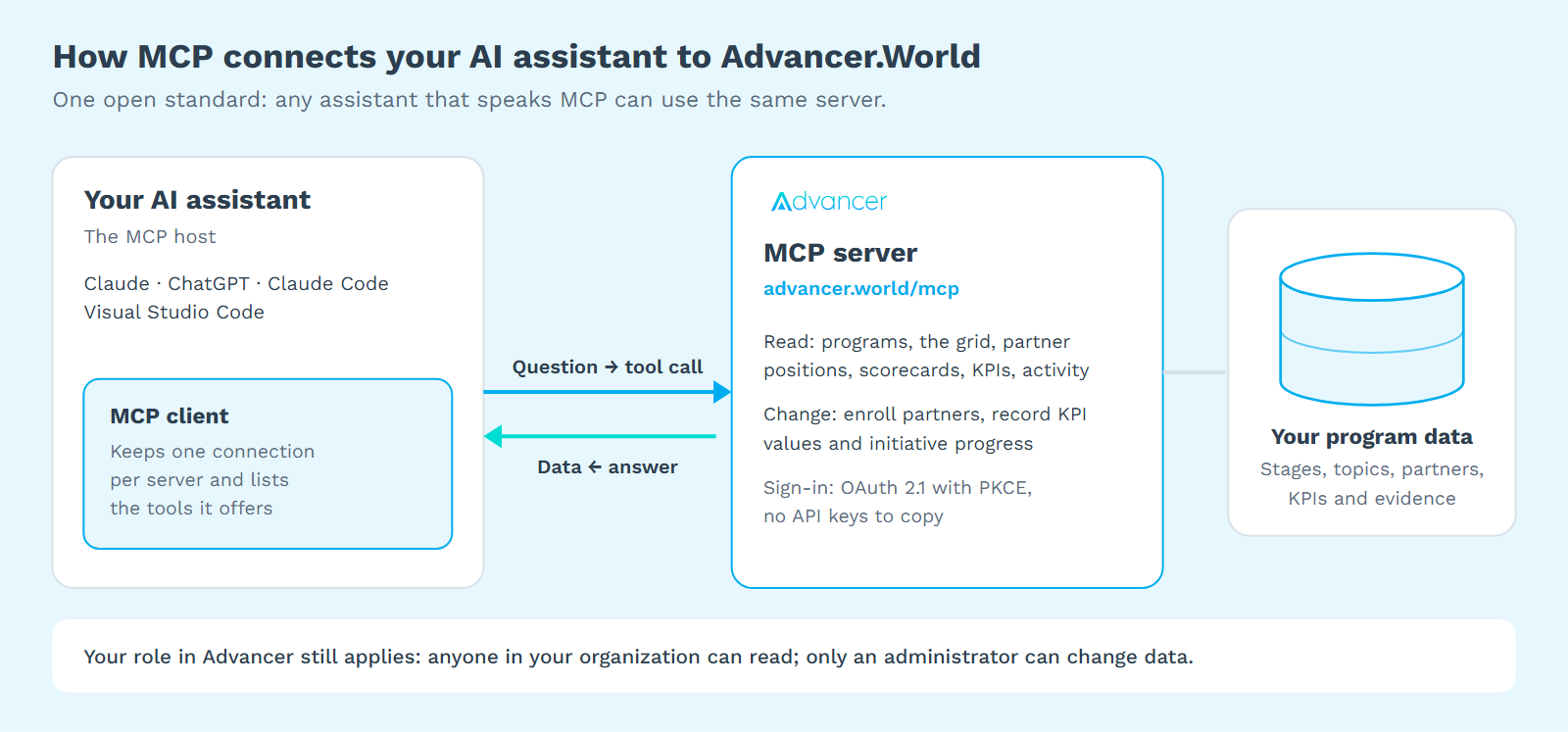
When you ask a question, the assistant looks at the tools the server lists, picks the ones that fit, calls them and writes its answer from the results. The numbers in that answer come from your system at the moment you ask, not from the model's training data. That single fact is why MCP matters for anyone who reports on programs.
What a program team can ask
For a team running a program with many partners, the useful questions are the ones you already ask in meetings. Here is what happens behind a few of them when the assistant is connected to a program system through MCP:
| You ask | What the assistant does |
|---|---|
| Which partners haven't moved forward this month? | Reads where each partner sits on the program's stages and their recent activity, then compares the dates. |
| How is the capacity program trending since the last quarter? | Reads the program's trend data and summarizes what rose and what stalled. |
| Who still owes the stage 2 action plan? | Reads the pending work of each transition and lists the partners with an open request. |
| Record 18 trained board members for Lakeside Youth Network. | Prepares the change, tells you exactly what it will write, and waits for your confirmation. |
| Draft a reminder to the partners that are stuck. | Combines what it read with its own writing. Sending stays with you. |
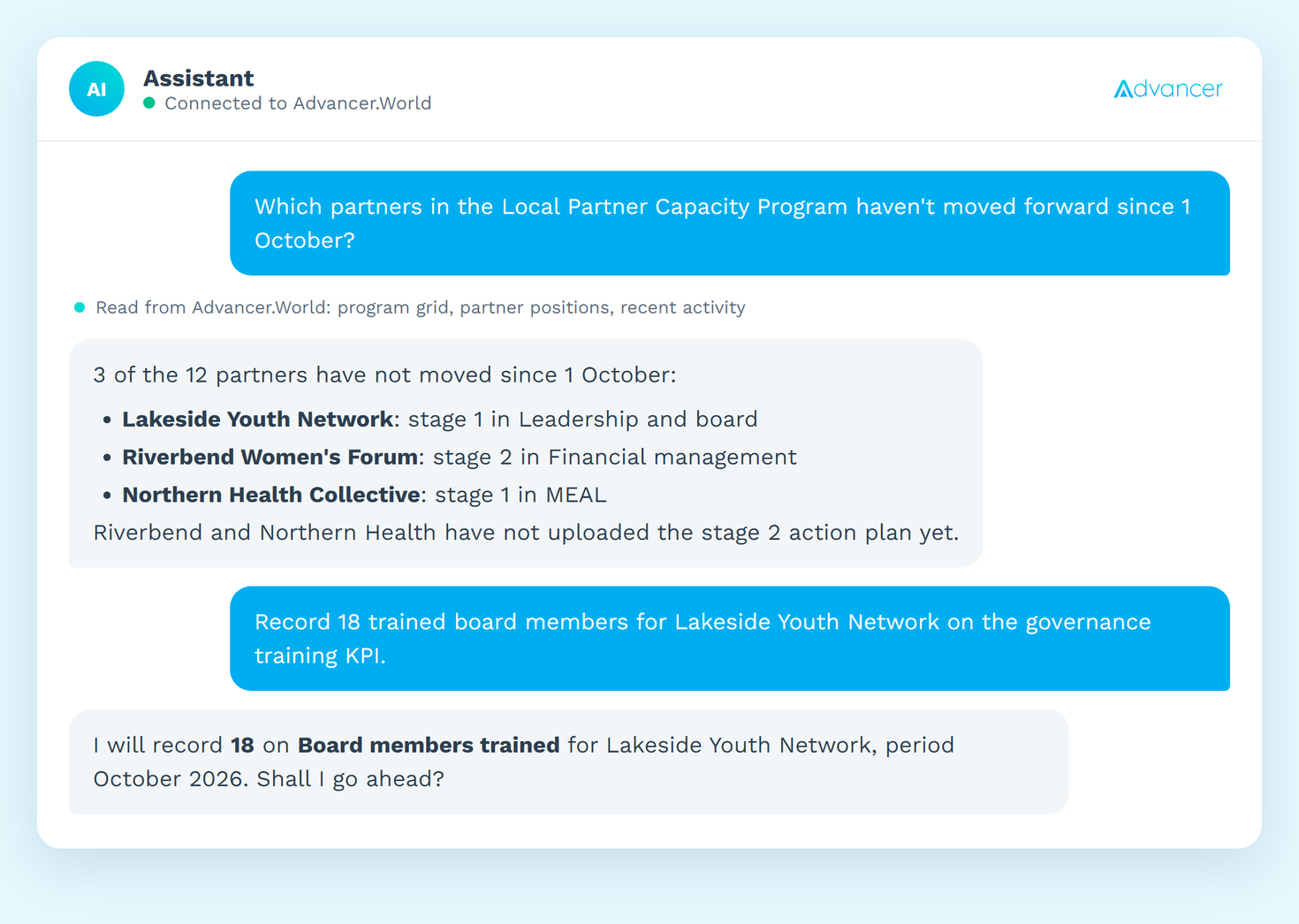
In my experience the biggest gain is not speed. It is that people who never opened the dashboard start asking questions, because a question in plain language costs them nothing. A country director who would never build a filtered report will happily ask "which of my partners are behind on safeguarding?" five minutes before a call.
Want to ask your own program these questions? Advancer.World runs programs with hundreds of partners on one maturity grid, and its MCP server connects Claude and ChatGPT to your programs, partners and KPIs (Gold and Enterprise plans).
What to watch out for
An assistant that can act on your data deserves the same care as a new colleague with a login. Five checks I would make before connecting any MCP server:
- It should only do what your role allows. A good server applies the permissions you already have in the system. If a program officer cannot delete a partner on screen, the assistant acting for them should not be able to either.
- It should ask before it changes anything. OWASP ranks prompt injection as the top risk for applications built on large language models in 2025: text hidden in a document or a message can steer the model. Its recommended mitigations include giving the model only the access its tasks need and putting a human approval in front of high-risk actions [5].
- You should sign in, not paste keys. MCP's authorization specification builds on OAuth 2.1 and requires clients to use PKCE, which protects the sign-in from interception [4]. Be wary of any server that asks you to paste an API key into a chat.
- Know where the data goes. Partner records include personal data. Check your organization's AI policy and the data terms of the assistant and plan you use before you connect.
- Check numbers before they leave the building. The data is live, but the summary is still written by a model. Before a figure goes into a donor report, ask the assistant which records it used, and look.
Connecting Advancer.World to Claude or ChatGPT
Advancer.World has an MCP server, included in the Gold and Enterprise plans. The setup takes about two minutes and needs no code:
- In your assistant, add a custom connector with the address
https://advancer.world/mcp. It works with Claude on the web and in the desktop app, Claude Code, Visual Studio Code, and ChatGPT in developer mode. - The first time it connects, Advancer opens in your browser. Sign in with your usual account and allow access. There are no keys to create or copy.
- Ask. Anyone in your organization can read; only an administrator can enroll partners, set positions, record KPI values and initiative progress, or invite people. Before any change, the assistant tells you what it will do and asks.
You can disconnect an assistant at any time from My Profile, under Connected AI applications; changing your password disconnects all of them. Partner users cannot connect an assistant yet. The Advancer.World MCP page lists what the tools cover.
FAQ
Is MCP the same as an API?
No. An API is built for developers writing code. MCP is built for AI assistants: the server describes its tools in a way a model can read and choose from. Many systems offer both; Advancer.World has a REST API for your own systems and an MCP server for assistants.
Does the AI model learn from my program data?
That depends on the assistant and the plan you use with it, not on MCP. MCP only carries the request and the answer. Read the provider's data-use terms; business and enterprise plans usually set out how your data is handled.
Do I need a developer to use MCP?
Not to use a server that already exists. You add an address to your assistant and sign in. Building a new MCP server for your own system is a developer's job.
Which assistants support MCP?
Claude, ChatGPT, Gemini, Microsoft Copilot, Cursor and Visual Studio Code had adopted it by December 2025 [2]. Each server says which ones it supports; for Advancer.World, the list is above.
Start with one question
You do not need an AI strategy to try this. Pick the question you are asked most often about your program, connect an assistant, and ask it. If the answer saves you an afternoon of chasing, you have found your first use case.
Run your program on one grid your assistant can read. Stages, topics, partners and KPIs in one place, free to start.
References
- Anthropic, "Introducing the Model Context Protocol", 25 November 2024, https://www.anthropic.com/news/model-context-protocol (accessed October 2026).
- Anthropic, "Donating the Model Context Protocol and establishing the Agentic AI Foundation", 9 December 2025, https://www.anthropic.com/news/donating-the-model-context-protocol-and-establishing-of-the-agentic-ai-foundation (accessed October 2026).
- Model Context Protocol, "Architecture overview", https://modelcontextprotocol.io/docs/learn/architecture (accessed October 2026).
- Model Context Protocol, "Specification 2025-06-18: Authorization", https://modelcontextprotocol.io/specification/2025-06-18/basic/authorization (accessed October 2026).
- OWASP GenAI Security Project, "LLM01:2025 Prompt Injection", https://genai.owasp.org/llmrisk/llm01-prompt-injection/ (accessed October 2026).
© 2026 Mourinho Solutions. All rights reserved.