Monday, 9:10. The Executive Director stops by your desk, coffee in hand. "Quick one: how is the program going? I have the board on Thursday."
It is a quick question. The answer is not. Your program has 24 member organizations, and its program progress lives in a shared spreadsheet, three e-mail threads, your notes from the last calls and the report you wrote in July. Two partners have not replied since August. By Wednesday evening you have a slide that says "good progress overall", which is true, and tells the board almost nothing.
If you run a program with dozens of partner organizations, you know this scene, whether the person asking is an Executive Director, an Advocacy Director or a Director of Programs. This article is about making that question take a minute instead of a week: what the director is really asking, why the usual answer is slow and vague, what a good view of program progress shows, and the new How is the program today? view in Advancer.World, which puts the answer on one screen and in a PDF for the board.
What the director is really asking
"How is the program going?" sounds like one question. It is five, and a good answer covers all of them:
- Where are we? The level the partners have reached on the path the program set out.
- Are we moving? The direction over the last weeks, and since the last board meeting.
- Who is doing the work? How many partners are active, and how many have gone quiet.
- Where are we weak? The themes where most partners are behind.
- Who needs a call this week? Names, each with a reason.
There is a sixth question that directors ask less often than they should: can I trust the indicators? A KPI average reported by 9 of 24 partners is not a program average. It is a sample of the partners who answer e-mails.
The director is not being demanding. They are accountable. In England and Wales, the Charity Commission's guidance for trustees says they should receive "timely information in a format that you can understand and use" [1]. Whoever answers to a board, a donor or a network's members needs exactly that from the program team. And the program team needs it from somewhere more reliable than its own memory.
Why program progress takes a week to report
In my experience, the delay is never about effort. Program teams work hard. It comes from where the information lives and how it is collected:
- It is scattered. Partner updates sit in spreadsheets, e-mails, call notes and the last quarterly report. Putting them together is the work, and it starts from zero every time someone asks.
- It is a snapshot, not monitoring. The OECD's evaluation glossary describes monitoring as "a continuing process" that gives management indications of implementation progress [2]. A report compiled for a board meeting is a photograph of one moment, usually a few weeks old by the time anyone reads it.
- It costs the partners too. Every question the board asks becomes a round of e-mails to partners. In the Grand Bargain of 2016, donors and aid organizations committed to simplify and harmonize reporting requirements, keeping reporting "substantive and qualitative while also lean enough" that resources go to people in need [3]. The best answer to a director's question needs no e-mail to any partner at all.
- It averages away the problem. "Good progress overall" can be true while four partners have not moved in three months.
That last point deserves a moment. My PhD was in operations research, and one habit the discipline gives you for life is distrust of a single average. Maturity stages are ordinal: stage 3 is above stage 2, but it is not "one more" than stage 2. An average stage is still useful, as a summary of where the program sits and which way it is going, but only next to the distribution behind it and the list of exceptions. On its own, it hides exactly the partners a director needs to hear about.
What a good view of program progress shows
Whether you build it in a spreadsheet or use a tool, a view that answers the director's questions has these parts, roughly in this order:
| The question | What answers it | Why this way |
|---|---|---|
| Where are we? | The average stage, on the program's own path | "Stage 2.3 of 4" means something to everyone who knows the program; 58% of an invented score does not |
| Are we moving? | The change in 30 days, and the line of the last months | Direction matters more than level: stage 2 and rising beats stage 3 and flat |
| Who is doing the work? | Partners active in the last 30 days; partners who moved forward, and back | Activity comes before progress: nobody moves a stage without work |
| Is the next step on its way? | The share of the work for the next stage already done | It tells you whether next month's progress is coming |
| Where do partners stand? | Partners by their lowest stage | A partner is as ready as its weakest area |
| Where are we weak? | Themes, weakest first | Where the next training, guidance or budget should go |
| Who needs a call? | Names with a reason: moved back, gone quiet, invitation not accepted | A list you can act on today |
| Can I trust the indicators? | How many partners report each KPI | Coverage first, values second |
Robert Kaplan and David Norton opened their 1992 article on the balanced scorecard with a sentence every program director should keep in mind: "What you measure is what you get" [4]. A view that shows only the average gets a team that chases the average. A view that shows the floor, the weak themes and the names gets a team that calls the partners who need it.
Want this view without building it? In Advancer.World it is one button on your program's page: the average stage, the direction, who is active, the weakest topics and who needs attention, read live from the program, with a PDF for the board. Free to start.
"How is the program today?" in Advancer.World
In Advancer.World, a program is a grid: stages, the maturity path, across topics and subtopics, the program's themes. The steps between stages carry the work: initiatives, surveys, document uploads and signature requests. Partners move along the grid by self-assessment, automatically when a step's work is done, or when your team confirms it. Every move and every piece of work is recorded as it happens, so the answer to the director's question was already in the program. It only needed a place to be read.
That place is the first button on the program's Design page: How is the program today? It opens a full-screen view, calculated from the program's data at the moment you open it.
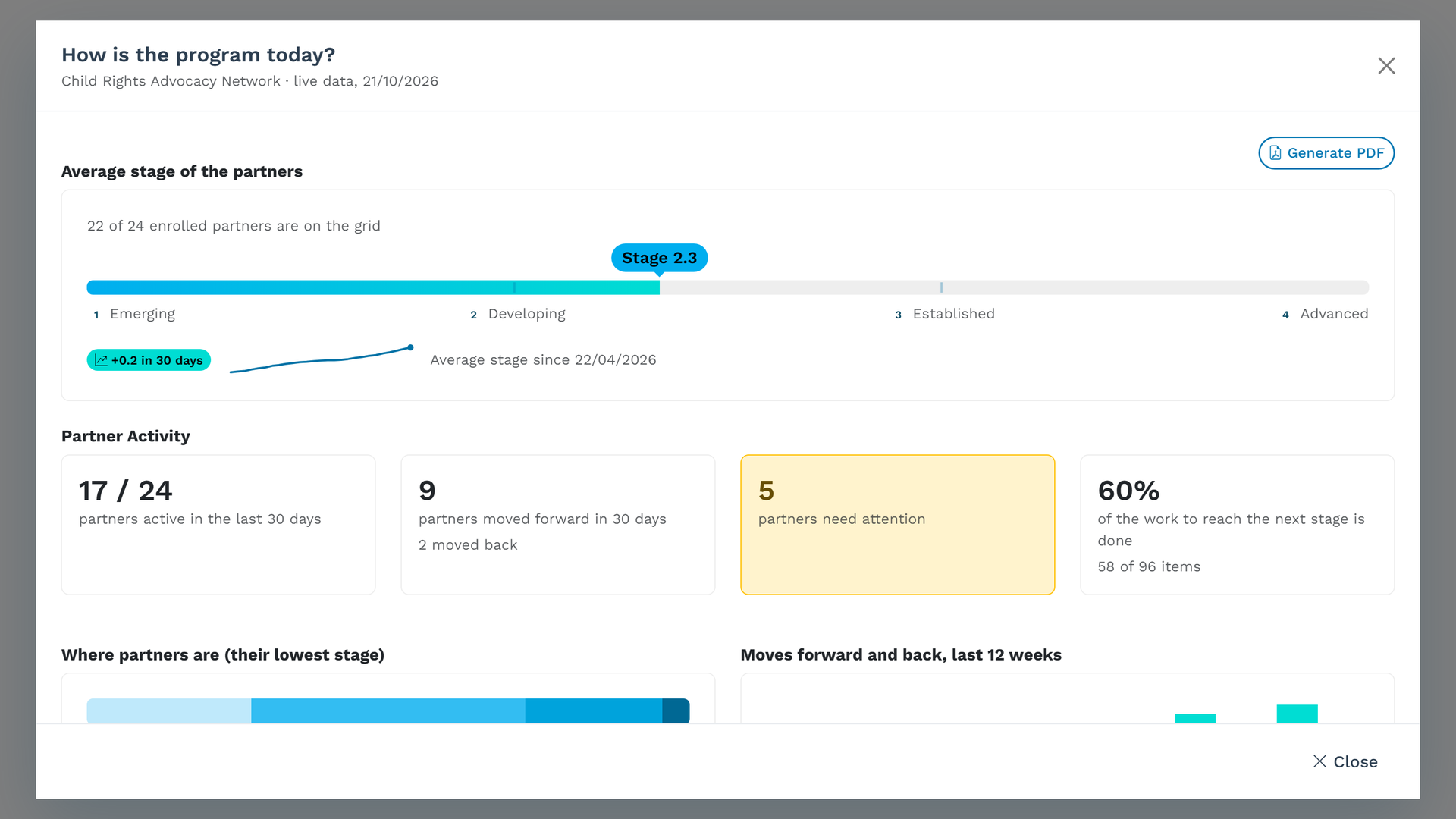
From top to bottom, it shows:
- The average stage of the partners. Every partner's position in every subtopic counts, shown on a bar from the first stage to the last. Next to it: the change against 30 days ago, and a line of the last six months, drawn from the program's daily snapshots.
- Partner activity, in four numbers. Partners active in the last 30 days; partners who moved forward (and back) in the same 30 days; partners who need attention; and how much of the work that leads to each partner's next stage is already done: initiatives completed, surveys answered, signatures completed, files uploaded.
- Where partners are. Partners by their lowest stage, and how many enrolled partners are not on the grid yet.
- Moves forward and back, last 12 weeks. The program's momentum, week by week.
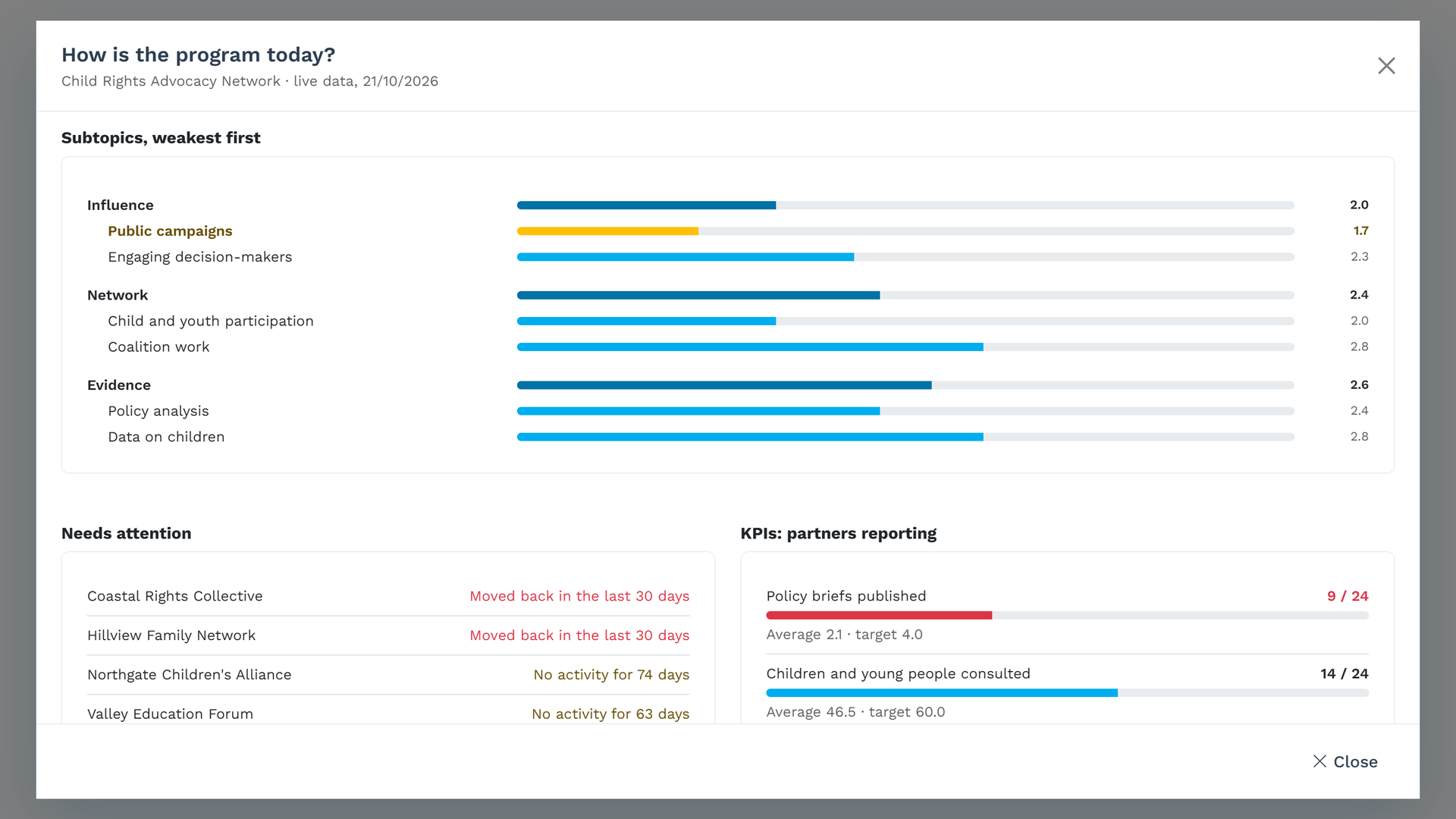
- Subtopics, weakest first. The topics from the weakest, each with its subtopics from the weakest, and the weakest of all highlighted.
- Needs attention. One line per partner, with its most urgent reason: moved back in the last 30 days, no activity for 60 days, or an invitation not accepted. Partners who moved back come first.
- KPIs: partners reporting. For each KPI, how many enrolled partners report it, with the average and the target, or the share of "yes" for a yes-or-no KPI. A KPI reported by fewer than half the partners shows in red.
The numbers are the ones Advancer's REST API and MCP server give, read the same way. If your director would rather ask an AI assistant connected to the program "how is the program today?", the assistant reads the same stage distribution, trends and activity, and the two answers agree. I explained how that connection works in a plain guide to MCP for program teams.
From the screen to the board: the PDF
A board pack needs a document, not a link. The Generate PDF button at the top right of the view turns it into an A4 PDF in one click: the title, the program and the date, then every section, each kept whole on a page. The file is named after the program and the day, such as Child Rights Advocacy Network_Status_2026-10-21.pdf, so a folder of them becomes the program's history at a glance.
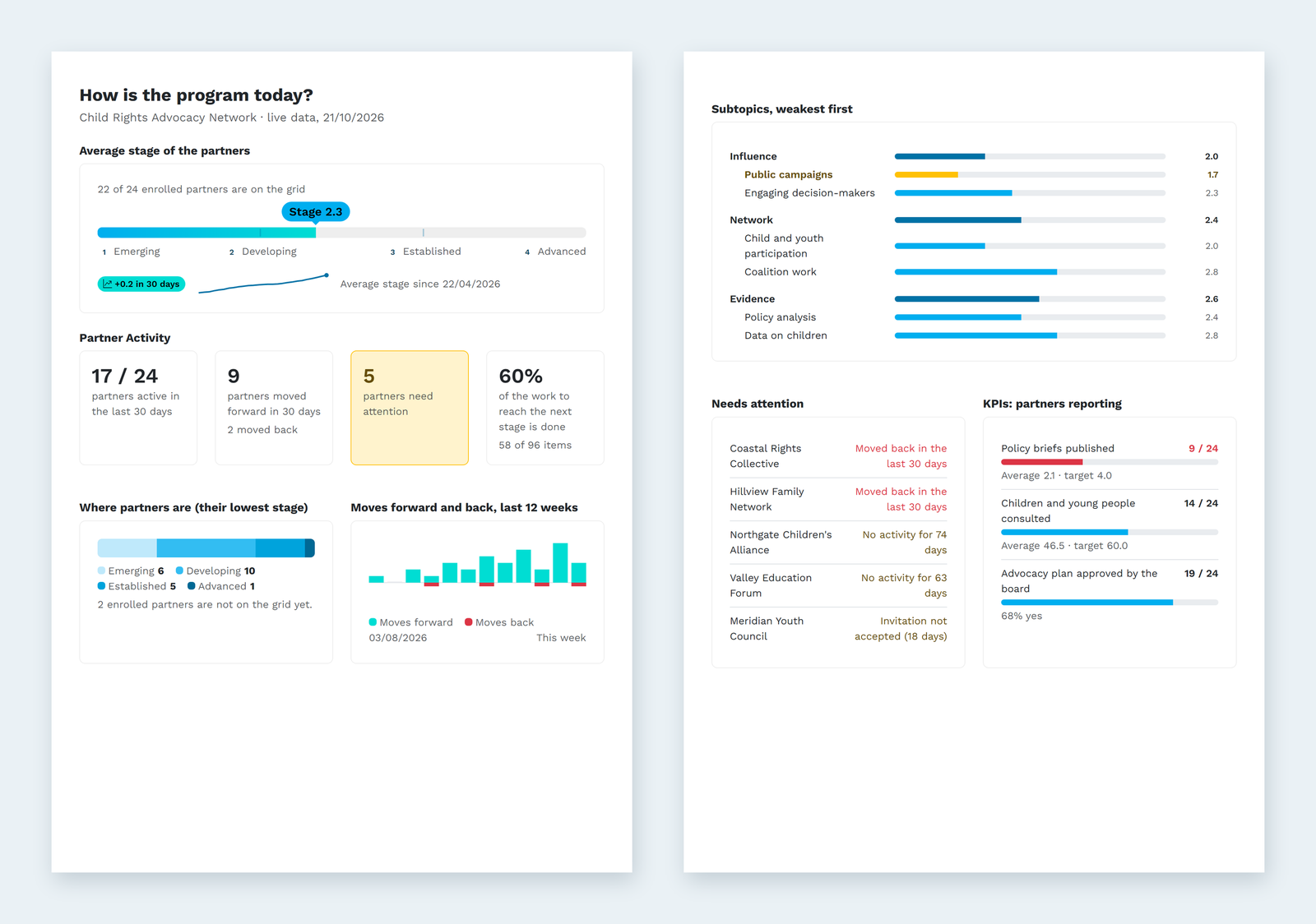
One honest detail: the PDF is drawn as images of the view, so it is made for reading, printing and attaching, not for copying text out of it. For numbers you want in your own documents, Advancer's reports and the API are the better route.
My advice for the board meeting: attach the PDF and write three sentences of your own above it. What changed since the last meeting, why, and what you will do about the weakest point. The view gives you the numbers in a minute. The hour you saved belongs to those three sentences.
Reading it in ten minutes: a routine for directors
- Direction first. Read the change in 30 days and the line before the level. A line that has been flat for two months is a conversation, whatever the level.
- Then the floor. How many partners are still at the first stage in at least one area? That number shapes next year more than the average does.
- Read the names. Pick the three partners on the attention list you will call this week. A partner that moved back has often just reported honestly, which is good news: thank them, and ask what changed.
- Ask why about the weakest subtopic. If most partners are weak in the same place, the problem is probably the program, not the partners: the next step may be unclear, too big, or missing the support it needs. Fix the step before you chase anyone.
- Check KPI coverage before quoting KPI values. If fewer than half the partners report a KPI, say so in the board paper, or leave the number out.
- Generate the PDF and write your three sentences.
Point 4 matters to me. Progress views can turn into league tables that rank partners, and partners notice. The same data reads very differently when you ask "what does the program need to change?" before "which partner is behind?". Assess with partners, not of them. The view is for your team: partners never see it, and never see each other's data. They see their own position, and what their next stage asks of them.
FAQ
Who can open "How is the program today?"
The team of the organization that owns the program, from the program's Design page. Partners cannot open it. Each partner sees its own position on the grid and what its next stage asks, never another partner's data.
Which plans include it?
Every plan, including Free, along with the PDF.
How is the average stage calculated?
Each partner has a position in each subtopic of the grid, and the average counts every one of those positions. A partner at stage 3 in two subtopics and stage 1 in four others pulls the program toward 1.7, not 3. The change compares today with the latest daily snapshot that is at least 30 days old.
Why are partners shown by their lowest stage?
Because a maturity path is only as strong as its weakest area. A partner that is advanced in policy analysis but has not started on child participation is not yet established. Its lowest stage shows where its next real step is.
Is the data live?
Yes. The view is calculated when you open it, from the positions, activity, work and KPI values recorded in the program. Only the six-month line comes from the daily snapshots.
A minute for the numbers, an hour for the why
The director's question is a fair one, and it deserves a better answer than "good progress overall". When the program already holds the positions, the activity and the work, the numbers should take a minute. Spend the time you save on the part only you can do: explaining what the numbers mean, and deciding what to do next.
Answer "how is the program today?" in one click. Design your program as a grid, invite your partners, and the view of where every one of them stands, and where the program is weak, is there whenever someone asks. Free to start.
References
- Charity Commission for England and Wales, "The essential trustee: what you need to know, what you need to do (CC3)", updated 16 September 2026, https://www.gov.uk/government/publications/the-essential-trustee-what-you-need-to-know-cc3/the-essential-trustee-what-you-need-to-know-what-you-need-to-do (accessed October 2026).
- OECD, "Glossary of Key Terms in Evaluation and Results-Based Management for Sustainable Development (Second Edition)", OECD Publishing, Paris, 2023, https://doi.org/10.1787/632da462-en-fr-es (accessed October 2026).
- "The Grand Bargain: A Shared Commitment to Better Serve People in Need", Istanbul, 23 May 2016, https://gblocalisation.ifrc.org/wp-content/uploads/2018/06/grand_bargain_final_22_may_final-2_0.pdf (accessed October 2026).
- Robert S. Kaplan and David P. Norton, "The Balanced Scorecard: Measures That Drive Performance", Harvard Business Review, January-February 1992, https://hbr.org/1992/01/the-balanced-scorecard-measures-that-drive-performance-2 (accessed October 2026).
© 2026 Mourinho Solutions. All rights reserved.