The hardest part of a maturity model is the first hour. You open an empty spreadsheet, write "Stage 1" in a cell, and then spend twenty minutes arguing with yourself about whether there should be four stages or five. By the end of the morning you have a beautiful header row and nothing under it.
The free partner maturity model builder exists to skip that hour. You start from a template that already has stages, topics and a description in every cell, and spend your time on the part that matters: making it true for your program and your partners. This article walks through the maturity model builder step by step, with a worked example, and ends with what to do once the model is ready.
If you want the method behind it first (why a maturity model, how to choose the stages, how to write a cell), read how to build a maturity model for your partner network. This one is about the tool.
What the maturity model builder gives you
A maturity model is a grid. The stages run across, from where most partners start to where you want the best ones to be. The topics run down: the themes your program depends on. Each cell describes what that stage looks like for that topic, in terms you can observe. The idea is old and well tested: one of the best-known capacity grids for nonprofits, written by McKinsey for Venture Philanthropy Partners in 2001, used four levels, from "clear need for increased capacity" to "high level of capacity in place", across seven elements of an organization [1].
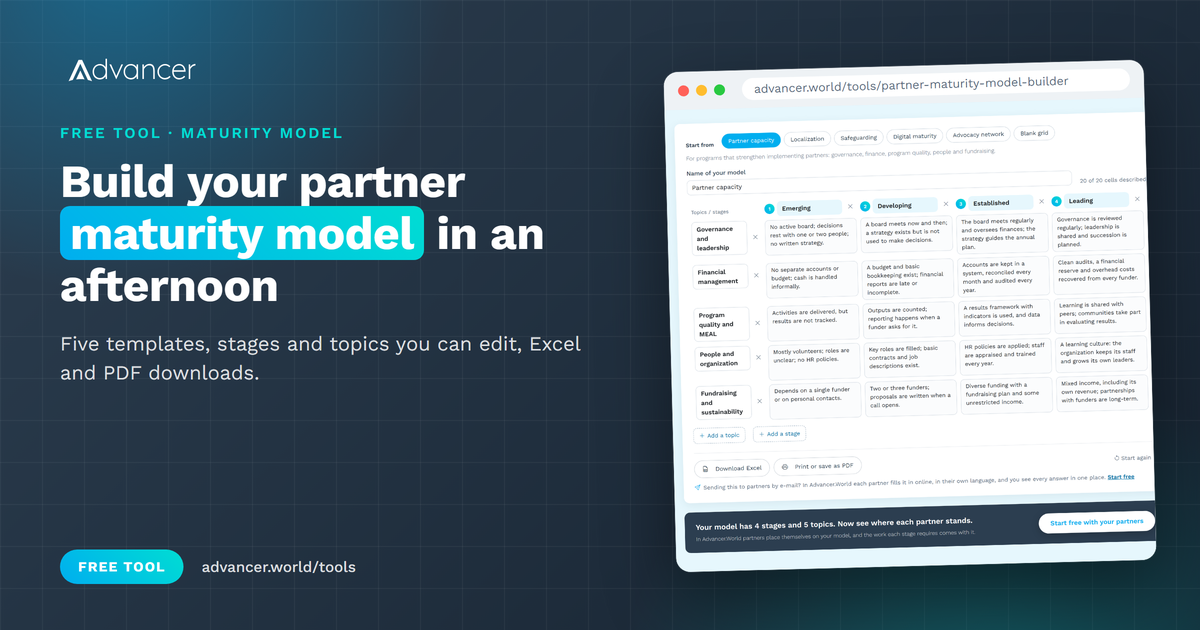
The builder gives you that structure, ready to edit:
- Five templates, each with four stages and four or five topics, every cell filled in: partner capacity, localization, safeguarding, digital maturity and advocacy network.
- A blank grid with four stages and three topics, if you prefer to start from nothing.
- Everything editable: rename the stages and topics, rewrite any cell, add stages (up to seven) and topics (up to twelve), or remove them.
- Downloads: Excel, or print and save as PDF.
Your model stays in your own browser while you work on it. Nothing is sent anywhere, so you can close the page and come back to it on the same device.
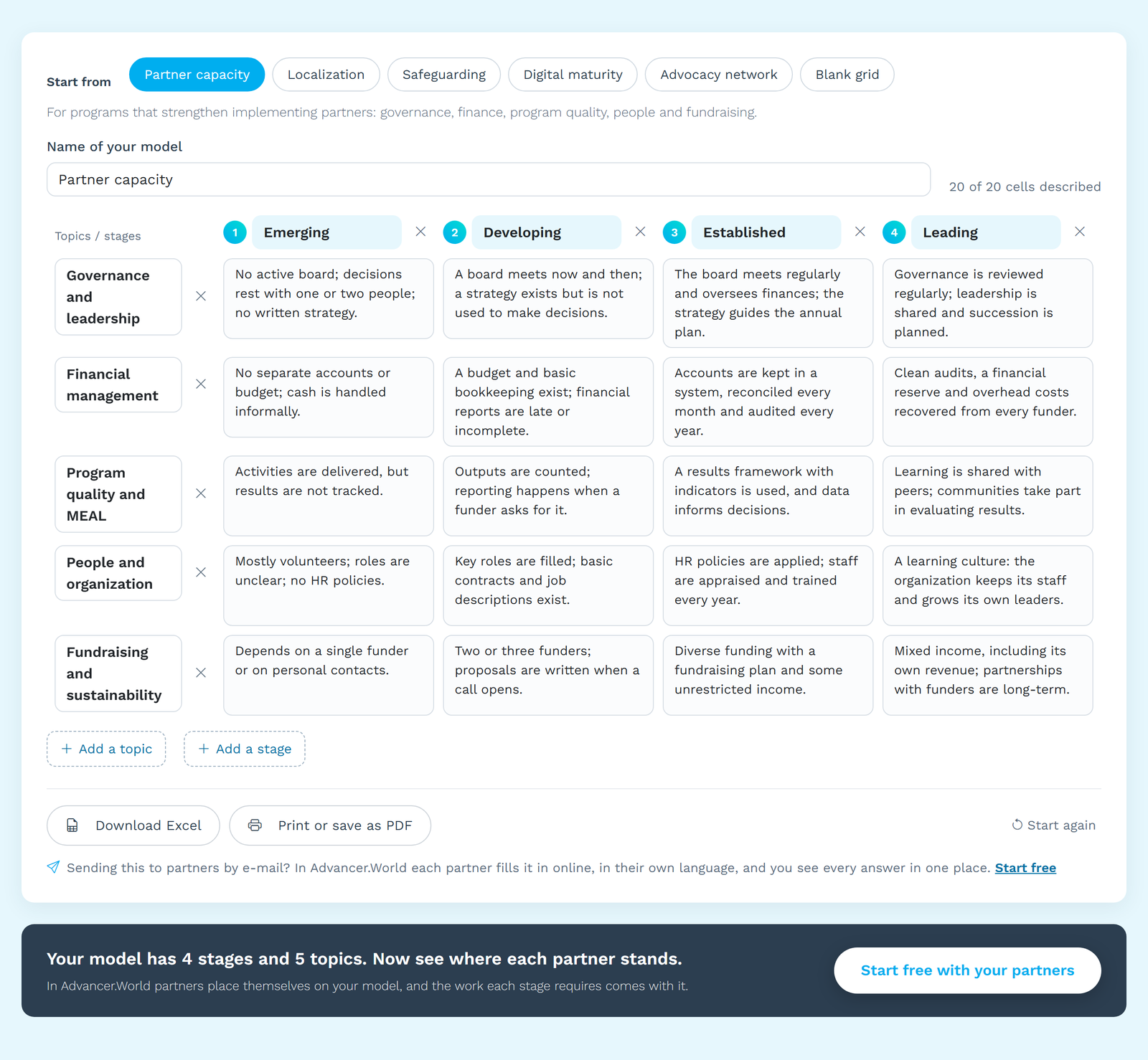
Which template to start from
| Template | For programs that... | Stages | Topics |
|---|---|---|---|
| Partner capacity | strengthen implementing partners | Emerging, Developing, Established, Leading | Governance, finance, program quality and MEAL, people, fundraising |
| Localization | measure how locally led their partnerships are | Subcontracted, Consulted, Collaborative, Locally led | Decision-making, funding, capacity strengthening, visibility, coordination |
| Safeguarding | work with children and vulnerable adults | Basic, Developing, Embedded, Exemplary | Policy, safe recruitment and training, reporting, communities and feedback |
| Digital maturity | move a network from spreadsheets to shared tools | Ad hoc, Emerging, Integrated, Data-driven | Strategy, data and reporting, tools, skills, data protection |
| Advocacy network | build an advocacy network or coalition | Aware, Engaged, Active, Champion | Participation, skills, voice and influence, leadership |
Pick the closest one, even if it is not quite right. Rewriting a cell that exists is much faster than writing one from nothing. Once the model is shared, decide how partners will move along it: see three ways to know where your partners stand.
Step by step: from template to your model
- Name the model after the program, so the downloaded file and the printout say what they are.
- Read the stages aloud. Would a partner recognize itself in each name, and would it be comfortable being called that? "Emerging" travels better than "Weak". Rename freely.
- Cut topics before you add them. Keep only the topics your program will actually work on in the next two or three years. Four or five is plenty for a first version.
- Rewrite each cell as something you can see. A policy exists, a report arrives on time, a budget line is there. Two people reading the cell should place a partner in the same stage.
- Check each row from left to right. Every stage should include the one before it, and the step between two cells should be one a partner can take in a year or so.
- Watch the counter. The builder shows how many cells are described ("18 of 20 cells described"). An empty cell is a decision you have postponed.
- Download it as Excel to share with colleagues, or print it for the workshop where you test it.
A worked example
Imagine a fictional federation of youth organizations, the Lakeside Youth Network, with 24 member organizations in nine countries. Its secretariat wants a model for member capacity. Starting from the partner capacity template, the team:
- keeps the four stages but renames "Leading" to "Mentoring", because the network's best members are expected to coach the others;
- drops "Fundraising and sustainability", which the network does not fund, and adds "Youth participation", which is its reason to exist;
- rewrites the Established cell of "Youth participation" as "Young people sit on the board and lead at least one program", which anyone can check in an annual report;
- removes the word "regularly" from three cells and puts a number in its place ("meets at least four times a year").
An afternoon later, the grid has five topics and twenty cells, all described. The secretariat prints it and takes it to the next members' meeting.
Test it with three partners before you use it
A maturity model written by the program team alone tends to describe the program team's worries. Before you roll it out, ask three partners (one strong, one in the middle, one just starting) to place themselves on the printed grid, and to circle the cells they find unclear or unfair. The cells where they disagree with you are where the model improves.
A practical tip for that session: print the grid on A3, one copy per partner, and give each partner a pen of a different color. Ask them to mark where they are today and where they want to be in a year. Two marks per row tell you more than a score, and the second one is the start of their plan.
This matters for more than accuracy. A model partners helped to shape is one they will use to plan their own development, rather than a scorecard imposed on them. The 2021 consultation behind "Time to Decolonise Aid" documented the power imbalances between international and local organizations in the aid sector [2]; a grid designed with partners is a small, practical way of not adding to them.
Your model, with every partner on it. In Advancer.World your stages and topics become the program's grid. Each partner places itself on it in its own language, the work each step requires (tasks, surveys, documents, KPIs) is attached to it, and you see the whole network on one screen. Free for one program and five partners.
Mistakes the builder will not stop you from making
- Too many stages. Seven stages look precise and are impossible to tell apart. Four is the most common choice for a reason.
- Adjectives instead of evidence. "Good financial management" means something different to every reader. "Accounts reconciled every month and audited every year" does not.
- A top stage nobody can reach. If no partner could be placed in the last column within five years, the model will feel like a judgment, not a path.
- Topics you will not support. Every topic in the model is a promise that you care about progress there. Do not include one you have no budget or expertise to help with.
- Freezing version 1. Review the model after the first round of assessments. Partners will tell you which cells do not work.
Beyond partner capacity: the advocacy network template
The same builder powers the engagement ladder for advocacy networks, which opens on the advocacy network template. There, the stages describe how deeply a member takes part, from aware to champion. Campaigners call this a ladder of engagement: a pathway that moves people from low-effort actions toward leading [3]. If your program is a coalition or a network of members rather than implementing partners, start there.
FAQ
How many stages should a maturity model have?
Four is the most common choice: enough to show progress, few enough that partners can tell the stages apart. The builder lets you use between two and seven.
How long does it take to build a maturity model?
Starting from a template, an afternoon for a first version that a small team agrees on. Testing it with three partners and revising it takes another two or three weeks, mostly waiting for meetings. Starting from a blank grid takes much longer, which is why the templates exist.
Can I change the templates?
Yes, everything: stage names, topic names and every cell. You can also add and remove stages and topics. The templates are free to use and adapt in your organization.
Where is my model saved?
Only in your browser, on your device, so you can return to it later. Nothing is sent to our servers. Download it as Excel to keep a copy or share it, and use "Start again" to clear it.
Can partners fill it in themselves?
In the free builder, partners can place themselves on a printed or shared copy. In Advancer.World, each partner places itself on the program's grid online, and you see every partner's position together.
One afternoon, one model, three partners
A maturity model does not need to be perfect to be useful. It needs to be clear enough that a partner can find itself on it and see the next step. Open the builder, pick the template closest to your program, and give yourself one afternoon. Then test it with three partners.
Run the model, not just the template. Design the program once in Advancer.World, invite your partners, and see who is moving and who is stuck. Partners and their people never pay.
References
- McKinsey & Company for Venture Philanthropy Partners, "Effective Capacity Building in Nonprofit Organizations", 2001, https://www.bridgespan.org/getmedia/ef1ff943-173b-48ec-843a-b5ce85c6c807/effective-capacity-building-VPP.pdf (accessed November 2026).
- Peace Direct, Adeso, Alliance for Peacebuilding and Women of Color Advancing Peace and Security, "Time to Decolonise Aid: Insights and lessons from a global consultation", second edition, May 2021, https://www.peacedirect.org/publications/timetodecoloniseaid/ (accessed November 2026).
- David Nyaribi and Juman Abujbara, "Ladder of engagement", Beautiful Trouble Toolbox, https://beautifultrouble.org/toolbox/tool/ladder-of-engagement (accessed November 2026).
© 2026 Mourinho Solutions. All rights reserved.